
Study and Examination Rules: 2025/26#
Lectures / exercises#
Lectures:
Monday 12:00 V/2: Prof. Janko Slavič, PhD (DS-P3, 01 4771 226, janko.slavic@fs.uni-lj.si)
Exercises:
Time |
Asst. Domen Gorjup, PhD |
Asst. Marko Zupan |
Asst. Gašper Krivic |
|---|---|---|---|
Thursday |
|||
8:00 |
T1 (I/4b) |
T2 (RU SP-24) |
|
10:00 |
T3 (I/4b) |
T4 (RU SP-24) |
|
Friday |
|||
8:00 |
F1 (I/4b) |
F2 (RU SP-24) |
|
12:00 |
F3 (I/4b) |
F4 (RU SP-24) |
Office hours:
Thursday 11:30 - 12:00 in classroom I/4b, by prior arrangement with the assistant.
Assistants:
Asst. Domen Gorjup, PhD (DS-P5, 01 4771 228, domen.gorjup@fs.uni-lj.si)
Asst. Marko Zupan (DS-P5, 01 4771 228, marko.zupan@fs.uni-lj.si)
Asst. Gašper Krivic (DS-P5, 01 4771 228, gasper.krivic@fs.uni-lj.si)
Tracking continuous study, announcements, etc.
We will run continuous study with the help of: moj.ladisk.si. To log in, use the email you have in VIS: video walkthrough of logging in.
Online classroom (e-ucilnica.fs.uni-lj.si)
Course-related materials can also be found in the online classroom.
Continuous study#
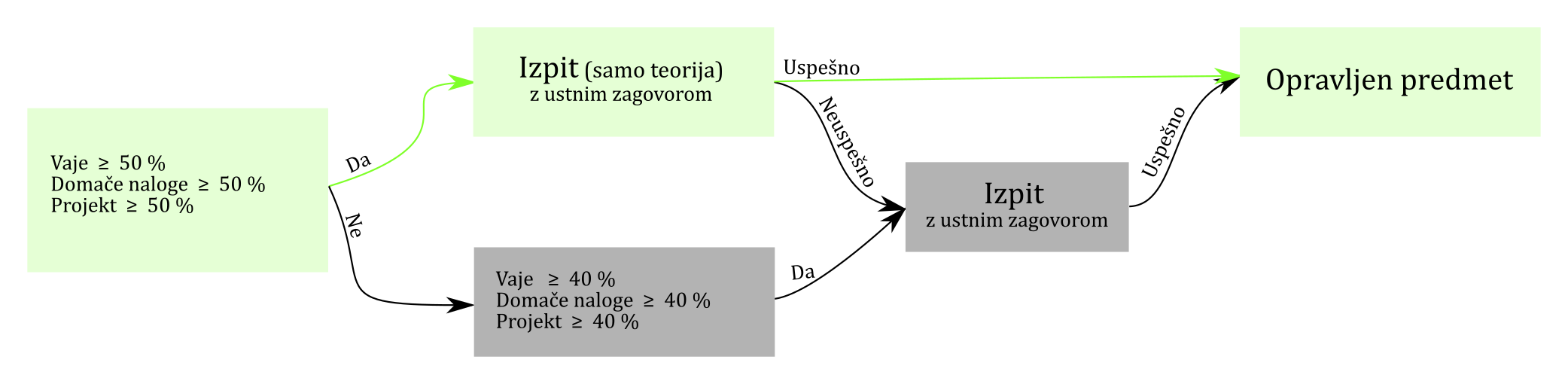
Grade composition#
5% participation in lectures
20% participation in exercises* (at least 50%)
10% weekly homework (at least 50%)
30% individual project (at least 50%)
35% theory test (at least 50%): see past tests
* You must come to lectures and exercises prepared; we will use some flipped-classroom principles!
Participation in exercises#
Participation in exercises is graded with short, announced written tests.
The tests are taken during exercises in the computer classroom, typically at the beginning of the exercise. They are solved in the VS Code environment and submitted and graded in the continuous-work system moj.ladisk.si (in the same way as homework).
Retaking participation grades for exercises#
It is possible to retake the grade of one short test, at an agreed time, typically at the end of the semester. The grade obtained from retaking is weighted by 0.75.
In the case of a justified absence (e.g., a medical excuse), the test grade for the missed exercise can be obtained only at the first following office-hours session.
Individual project#
It relates to any content of any course at the Faculty of Mechanical Engineering and is defined by the student themselves. The project must include the following content:
symbolic computation,
systems of linear equations,
interpolation or approximation,
root finding,
integration or differentiation,
solving differential equations.
The grade of the individual project is composed of:
numerical correctness (45%),
appropriateness of the methods used (30%),
comments and reasoning (15%),
structure, tidiness, use of your own modules, code style (docstrings) (25%),
personal approach / creative addition (25%),*
prepared code tests and/or user interface (5%).
Instructions for submitting the project:
The deadline for submitting the project is listed below, among the important dates.
To create the project, use the template, which you can find here
Submit the project as a
zipfile named: First and last name, enrollment number.zip. Example:Janez Novak, 23201111.zip.The size of the
zipfile should not exceed 20 MB.Submit the ZIP in the online classroom.
Before submitting:
in the project, comment out (add #) any installation of additional packages and functions such as
%%timeit:
# !pip install package_name
# %%timeit
Check that the paths to images and other files are given in relative form (e.g.,
'image.jpg', not'D:\Numerical methods\project\image.jpg').do
Kernel\(\to\)Restartand thenCell\(\to\)Run All. Make sure that all cells execute correctly.
* A creative addition is treated as programming content that was not specifically covered in lectures and exercises. For example:
animation of results using matplotlib,
other forms of advanced visualization (Plotly, Bokeh, vispy, pyqtgraph, VTK…),
automatic reading of data from the web, sending results by email,
machine-generated reports,
use of the Pandas library, writing results to a database, MS Excel,
use of the Raspberry Pi or Arduino platforms, data acquisition,
building a web application (Flask, Django),
use of modules and libraries such as scikit-learn, TensorFlow, PyOpenCV.
Plagiarism in the individual project
All submitted individual projects are checked with a plagiarism-detection system.
The system checks the similarity of submitted documents against all other projects from the current and past academic years. Any matching of text and of procedures in the submitted code is flagged as plagiarism (even if it is used in a different context, a different order, with renamed variables, etc.). The content of the lecture templates published in this repository is excluded from the check.
If a significant part of the content of your project matches another project, we cannot grade it as your own independent work. This means that you have not completed the exercises and do not meet the requirements to take the exam.
Homework (moj.ladisk.si)#
General instructions for solving
We assign weekly homework in the moj.ladisk.si system. You solve the homework in the Jupyter Notebook environment.
Save the files you download from the web as a
.ziparchive (if your browser does not add the.zipextension to the file, do it yourself).Fully extract the archive of files you download from the web.
In the folder with the extracted files, open a command window and run the command
jupyter notebook.Run the cells in the
.ipynbhomework file in order (including the cells at the very top of the file!).When solving, results are sent to the moj.ladisk.si online system and are automatically checked on the fly. An internet connection is required when solving.
We have also prepared video instructions for solving.
Time limit for solving homework
Homework has a defined solving window time:
Until the solving window opens, early solving of the assignment without a time limit is possible.
During the solving window, the allowed time for solving the assignment is limited. The time limit starts from the moment you first open the assignment within the solving window.
After the window closes, the assignment closes and solving is no longer possible.
We advise you to solve as much of the assignment as possible during the early-solving period, before the solving window opens.
Using a Joker to postpone an obligation
Each student has two Jokers available in the course, which you can use to postpone an obligation to the future.
Using a Joker, you can move the solving window of a homework assignment forward by \(\leq\) 14 days.
Using a Joker is not possible if you have already opened the assignment.
Before the start of the solving window, one Joker is needed to move the assignment; during the solving window, two are needed.
Proposed grade based on continuous study#
Proposed grade:
50 to 60%: 6
60 to 70%: 7
70 to 80%: 8
80 to 90%: 9
90% and above: 10
(Undefined ranges are intermediate grades.)
The individual project and the proposed grade are defended in an oral defense.
In the defense, we also take into account the qualitative assessment of participation in exercises and lectures.
If you meet the continuous-work requirements (exercises, homework, project), you have one opportunity to take the test on theory only at the winter exam dates after the end of the semester.
Important dates#
Submission of the individual project: Jan 12, 2026 by 12:00 *
The theory test is taken on any winter exam date (you have one opportunity).
Defenses: after the exam date.
* If submitted at least 1 week before the deadline, the result is multiplied by \(1.1\); in the case of a late submission, the result is multiplied by \(0.9^n\), where \(n\) is the number of started days of delay.
Exam#
Meeting the requirements to take the exam: each individual event (except theory and participation in lectures) that makes up the grade must be greater than 40%.
The exam is taken in two parts: 60 min for three theoretical questions (see a sample exam) and 50 min of testing the application of numerical methods on the computer (typically two problems; you may bring any written sources, but there is no internet access).
For a passing grade, both parts must be passed.
References#
Slavič J.: Programiranje in numerične metode s Pythonom, executable book or online book, 2015-
Petrišič J.: Uvod v Matlab za inženirje, 2011
Demšar J. Python za programerje, 2012 (see the online classroom: http://goo.gl/n4pVUe)
Nicolas P. Rougier: From Python to Numpy, 2017 online book
Kiusalaas J: Numerical Methods in Engineering with Python 3, 2013
Fangohr H. Python for Computational Science and Engineering, 2014 (available online: http://goo.gl/nCOfY0)
Bucky R. Python 3.4 Programming Tutorials (videos available at: http://goo.gl/ie6nfD)
Projekt TOMO (more content; see especially the courses at FMF and FRI)
Using the Numpy, Scipy, etc. packages for engineers Mr. P Solver (YouTube)
You can find some online classrooms on the topic of Python at pinm.ladisk.si
Requirements for taking the course in advance?#
The course cannot be taken in advance.